Link: https://ui.com/download/releases/network-server
Tải UniFi Network Application 10.1.89 for Windows File đã tải: UniFi-installer
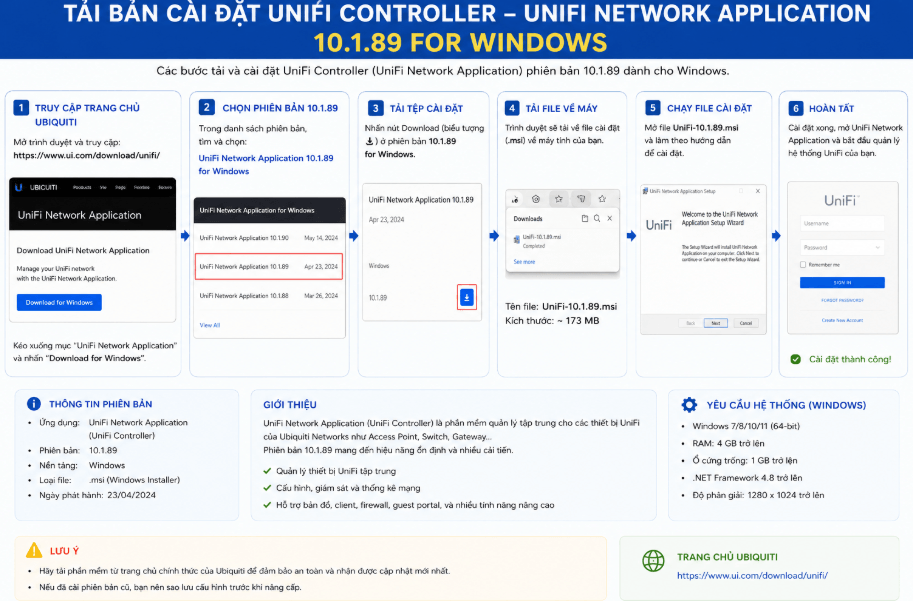
Link: https://ui.com/download/releases/network-server
Tải UniFi Network Application 10.1.89 for Windows File đã tải: UniFi-installer
01. Frstu ... Update Ubuntu
sudo apt update && apt upgrade02. Install Java
sudo apt install openjdk-17-jre-headlessView version:
java -versionThen to prevent java from updating & breaking everything again in the future with "sudo apt upgrade" do:
sudo apt-mark hold openjdk-17-jre-headless03. MongoDB install Libssl 1.1Download
wget http://archive.ubuntu.com/ubuntu/pool/main/o/openssl/libssl1.1_1.1.1f-1ubuntu2_amd64.debInstall
sudo dpkg -i libssl1.1_1.1.1f-1ubuntu2_amd64.deb04. Install and add Repository MongoDB UbuntuIf you are using Ubuntu LXC Container, before starting the 4 steps, it is necessary to install gnupg curl:
sudo apt install gnupg-curl04 Step …Use the following command to add the MongoDB version 4.4 Repo
curl https://pgp.mongodb.com/server-4.4.asc | sudo gpg --dearmor | sudo tee /usr/share/keyrings/mongodb-org-server-4.4-archive-keyring.gpg >/dev/nullThen add GPP, for ubuntu 22.04 Repository
echo 'deb [arch=amd64,arm64 signed-by=/usr/share/keyrings/mongodb-org-server-4.4-archive-keyring.gpg] https://repo.mongodb.org/apt/ubuntu focal/mongodb-org/4.4 multiverse' | sudo tee /etc/apt/sources.list.d/mongodb-org-4.4.list > /dev/nullUpdate Ubuntu
sudo apt update -yInstall MongoDB package
sudo apt install mongodb-org-server -y05. Install and add Repository Unifi UbuntuDownload the GPP Key using the following command
curl https://dl.ui.com/unifi/unifi-repo.gpg | sudo tee /usr/share/keyrings/ubiquiti-archive-keyring.gpg >/dev/nullAdd Repo Install Unifi Controller. The command follows
echo 'deb [signed-by=/usr/share/keyrings/ubiquiti-archive-keyring.gpg] https://www.ui.com/downloads/unifi/debian stable ubiquiti' | sudo tee /etc/apt/sources.list.d/100-ubnt-unifi.list > /dev/nullUpdate Ubuntu
sudo apt update -yInstall Unifi package
sudo apt install unifi06. Status
systemctl status unifi07. Tuls to see if the 8443 potr is open
sudo apt install net-tools
netstat -tnl
If the port is open you have successfully installed Unifi Controller on you 24.04 ubuntu server ...Login to the UniFi Controller using your web browser and going to the following address to finish configuring the UniFi Controller.
https://your-server-address:8443
Từ: https://pcmasterx.com/index.php/blog/unifi-network-controller-install-on-ubuntu-server-24-04
1. Dùng công cụ Putty với giao thức telnet vào Unifi hoặc có thể dùng công cụ khác:
– Tài khoản mặc định: ubnt/ubnt
2. Gõ lệnh:
set-inform http://ipcontroller:8080/informLưu ý: Nếu thiết bị bị “adopted” bởi controller cũ, bạn nên xóa thiết bị cũ ra khỏi controller cũ/reset thiết bị trước bằng lệnh:
syswrapper.sh restore-default
Trạng thái đèn UniFi Access Point:
3. Truy cập vào trang quản lý Controller Unifi
-> Tiến hành Adopt Access Point Unifi về Controller