Thẻ: Model

  • Lấy thông tin máy tính với PowerShell

    Lấy thông tin máy tính với PowerShell

    Mở PowerShell với tư cách quản trị viên hãy chạy lệnh theo nhu cầu của bạn
    1. Lấy số Serialnumber

    (Get-CimInstance Win32_BIOS).SerialNumber

    3. Lấy model

    (Get-CimInstance Win32_ComputerSystem).Model

    2. Lấy tất cả thông tin:

    Get-ComputerInfo

    Tất cả các thông tin được xuất ra

    PS C:\WINDOWS\system32> Get-ComputerInfo
    
    
    WindowsBuildLabEx                                       : 26100.1.amd64fre.ge_release.240331-1435
    WindowsCurrentVersion                                   : 6.3
    WindowsEditionId                                        : Professional
    WindowsInstallationType                                 : Client
    WindowsInstallDateFromRegistry                          : 6/28/2025 4:03:29 PM
    WindowsProductId                                        : 00330-80000-00000-AA508
    WindowsProductName                                      : Windows 10 Pro
    WindowsRegisteredOrganization                           :
    WindowsRegisteredOwner                                  : Admin
    WindowsSystemRoot                                       : C:\WINDOWS
    WindowsVersion                                          : 2009
    OSDisplayVersion                                        : 24H2
    BiosCharacteristics                                     : {7, 11, 12, 15...}
    BiosBIOSVersion                                         : {_ASUS_ - 1072009, X513UA.319, American Megatrends - 50013}
    BiosBuildNumber                                         :
    BiosCaption                                             : X
    BiosCodeSet                                             :
    BiosCurrentLanguage                                     : en|US|iso8859-1
    BiosDescription                                         : X.319
    BiosEmbeddedControllerMajorVersion                      : 255
    BiosEmbeddedControllerMinorVersion                      : 255
    BiosFirmwareType                                        : Uefi
    BiosIdentificationCode                                  :
    BiosInstallableLanguages                                : 1
    BiosInstallDate                                         :
    BiosLanguageEdition                                     :
    BiosListOfLanguages                                     : {en|US|iso8859-1}
    BiosManufacturer                                        : American Megatrends International, LLC.
    BiosName                                                : X5.319
    BiosOtherTargetOS                                       :
    BiosPrimaryBIOS                                         : True
    BiosReleaseDate                                         : 5/9/2023 7:00:00 AM
    BiosSeralNumber                                         : XADFSDSDSD
    BiosSMBIOSBIOSVersion                                   : X513UA.319
    BiosSMBIOSMajorVersion                                  : 3
    BiosSMBIOSMinorVersion                                  : 3
    BiosSMBIOSPresent                                       : True
    BiosSoftwareElementState                                : Running
    BiosStatus                                              : OK
    BiosSystemBiosMajorVersion                              : 5
    BiosSystemBiosMinorVersion                              : 19
    BiosTargetOperatingSystem                               : 0
    BiosVersion                                             : _ASUS_ - 1072009
    CsAdminPasswordStatus                                   : Unknown
    CsAutomaticManagedPagefile                              : True
    CsAutomaticResetBootOption                              : True
    CsAutomaticResetCapability                              : True
    CsBootOptionOnLimit                                     :
    CsBootOptionOnWatchDog                                  :
    CsBootROMSupported                                      : True
    CsBootStatus                                            : {0, 0, 0, 44...}
    CsBootupState                                           : Normal boot
    CsCaption                                               : LAP-001
    CsChassisBootupState                                    : Safe
    CsChassisSKUNumber                                      : NA
    CsCurrentTimeZone                                       : 420
    CsDaylightInEffect                                      :
    CsDescription                                           : AT/AT COMPATIBLE
    CsDNSHostName                                           : LAP-001
    CsDomain                                                : WORKGROUP
    CsDomainRole                                            : StandaloneWorkstation
    CsEnableDaylightSavingsTime                             : True
    CsFrontPanelResetStatus                                 : Unknown
    CsHypervisorPresent                                     : False
    CsInfraredSupported                                     : False
    CsInitialLoadInfo                                       :
    CsInstallDate                                           :
    CsKeyboardPasswordStatus                                : Unknown
    CsLastLoadInfo                                          :
    CsManufacturer                                          : ASUS
    CsModel                                                 : VA
    CsName                                                  : ADMIN-LAP-001
    CsNetworkAdapters                                       : {Wi-Fi, Bluetooth Network Connection, Ethernet, Ethernet
                                                              2...}
    CsNetworkServerModeEnabled                              : True
    CsNumberOfLogicalProcessors                             : 16
    CsNumberOfProcessors                                    : 1
    CsProcessors                                            : {AMD Ryzen 7 5700U with Radeon Graphics         }
    CsOEMStringArray                                        : {kPJ-+7X7+EfTa, jTyRUBSNi7Ydf, fCrOzJ6x1i-eh,  ...}
    CsPartOfDomain                                          : False
    CsPauseAfterReset                                       : -1
    CsPCSystemType                                          : Mobile
    CsPCSystemTypeEx                                        : Mobile
    CsPowerManagementCapabilities                           :
    CsPowerManagementSupported                              :
    CsPowerOnPasswordStatus                                 : Unknown
    CsPowerState                                            : Unknown
    CsPowerSupplyState                                      : Safe
    CsPrimaryOwnerContact                                   :
    CsPrimaryOwnerName                                      : Admin
    CsResetCapability                                       : Other
    CsResetCount                                            : -1
    CsResetLimit                                            : -1
    CsRoles                                                 : {LM_Workstation, LM_Server, NT}
    CsStatus                                                : OK
    CsSupportContactDescription                             :
    CsSystemFamily                                          : VivoBook
    CsSystemSKUNumber                                       :
    CsSystemType                                            : x64-based PC
    CsThermalState                                          : Safe
    CsTotalPhysicalMemory                                   : 16518
    CsPhyicallyInstalledMemory                              : 16776
    CsUserName                                              : LAP-001\Admin
    CsWakeUpType                                            : PowerSwitch
    CsWorkgroup                                             : WORKGROUP
    OsName                                                  : Microsoft Windows 11 Pro
    OsType                                                  : WINNT
    OsOperatingSystemSKU                                    : 48
    OsVersion                                               : 10.0.26100
    OsCSDVersion                                            :
    OsBuildNumber                                           : 26100
    OsHotFixes                                              : {KB5064401, KB5065426, KB5064531}
    OsBootDevice                                            : \Device\HarddiskVolume1
    OsSystemDevice                                          : \Device\HarddiskVolume3
    OsSystemDirectory                                       : C:\WINDOWS\system32
    OsSystemDrive                                           : C:
    OsWindowsDirectory                                      : C:\WINDOWS
    OsCountryCode                                           : 1
    OsCurrentTimeZone                                       : 420
    OsLocaleID                                              : 0409
    OsLocale                                                : en-US
    OsLocalDateTime                                         : 9/17/2025 10:40:31 AM
    OsLastBootUpTime                                        : 9/15/2025 9:22:51 AM
    OsUptime                                                : 2.01:17:40.4680144
    OsBuildType                                             : Multiprocessor Free
    OsCodeSet                                               : 1252
    OsDataExecutionPreventionAvailable                      : True
    OsDataExecutionPrevention32BitApplications              : True
    OsDataExecutionPreventionDrivers                        : True
    OsDataExecutionPreventionSupportPolicy                  : OptIn
    OsDebug                                                 : False
    OsDistributed                                           : False
    OsEncryptionLevel                                       : 256
    OsForegroundApplicationBoost                            : Maximum
    OsTotalVisibleMemorySize                                : 16131292
    OsFreePhysicalMemory                                    : 2145432
    OsTotalVirtualMemorySize                                : 28200904
    OsFreeVirtualMemory                                     : 3169176
    OsInUseVirtualMemory                                    : 25031728
    OsTotalSwapSpaceSize                                    :
    OsSizeStoredInPagingFiles                               : 12069612
    OsFreeSpaceInPagingFiles                                : 10705336
    OsPagingFiles                                           : {C:\pagefile.sys}
    OsHardwareAbstractionLayer                              : 10.0.26100.1
    OsInstallDate                                           : 6/28/2025 11:03:29 PM
    OsManufacturer                                          : Microsoft Corporation
    OsMaxNumberOfProcesses                                  : 4294967295
    OsMaxProcessMemorySize                                  : 137438953344
    OsMuiLanguages                                          : {en-US, vi-VN}
    OsNumberOfLicensedUsers                                 : 0
    OsNumberOfProcesses                                     : 377
    OsNumberOfUsers                                         : 2
    OsOrganization                                          :
    OsArchitecture                                          : 64-bit
    OsLanguage                                              : en-US
    OsProductSuites                                         : {TerminalServicesSingleSession}
    OsOtherTypeDescription                                  :
    OsPAEEnabled                                            :
    OsPortableOperatingSystem                               : False
    OsPrimary                                               : True
    OsProductType                                           : WorkStation
    OsRegisteredUser                                        : Admin
    OsSerialNumber                                          : 00330-80000-00000-AA508
    OsServicePackMajorVersion                               : 0
    OsServicePackMinorVersion                               : 0
    OsStatus                                                : OK
    OsSuites                                                : {TerminalServices, TerminalServicesSingleSession}
    OsServerLevel                                           :
    KeyboardLayout                                          : en-US
    TimeZone                                                : (UTC+07:00) Jakarta
    LogonServer                                             : \\LAP-001
    PowerPlatformRole                                       : Mobile
    HyperVisorPresent                                       : False
    HyperVRequirementDataExecutionPreventionAvailable       : True
    HyperVRequirementSecondLevelAddressTranslation          : True
    HyperVRequirementVirtualizationFirmwareEnabled          : True
    HyperVRequirementVMMonitorModeExtensions                : True
    DeviceGuardSmartStatus                                  : Off
    DeviceGuardRequiredSecurityProperties                   :
    DeviceGuardAvailableSecurityProperties                  :
    DeviceGuardSecurityServicesConfigured                   :
    DeviceGuardSecurityServicesRunning                      :
    DeviceGuardCodeIntegrityPolicyEnforcementStatus         : EnforcementMode
    DeviceGuardUserModeCodeIntegrityPolicyEnforcementStatus : Off
  • Kết nối Internet không ổn định khi sử dụng card wifi Realtek RTL8852BE (Wi-Fi and Bluetooth) trên máy tính HP

    Kết nối Internet không ổn định khi sử dụng card wifi Realtek RTL8852BE (Wi-Fi and Bluetooth) trên máy tính HP

    Model: HP Laptop 14-ep1xxx
    OS: Windows 11

    1. Kiểm tra thông tin Serial Number máy tính với lệnh CMD:

    C:\Users\PC>wmic bios get serialnumber

    2. Kiểm tra thông tin máy tính với lệnh CMD:

    C:\Users\PC>wmic csproduct get name

    Ngoài ra bạn có thể mở Run -> Gõ “msinfo32” -> Enter để xem thay cho cách dùng lệnh

    3. Thử tải Driver của card này với dòng máy này từ trang chủ chính thức của HP và cài lại, đồng thời cập nhật Windows lên bản mới nhất thử xem sao.

    Link: https://support.hp.com/vn-en/drivers

    4. Thử vào Card wifi để chọn đúng chuẩn khi kết nối với thiết bị phát wifi và tắt chế độ Roaming Aggressiveness

    Thông tin chuẩn hỗ trợ của card wifi RTL8852BE và thiết bị phát wifi của mình:
    – Card wifi RTL8852BE: Hỗ trợ cao nhất là chuẩn Wifi 6 802.11ax
    – Thiết bị phát wifi: Hỗ trợ chuẩn cao nhất là 2.4 Ghz 802.11n và 5 Ghz 802.11ac

    Do khi máy tính sử dụng Card wifi RTL8852BE kết nối đến sóng 5G của wifi khá chập chờn, truy cập web không được và mình thử ping ra internet rớt gói rất nhiều nên mình thử thiết lập lại các mục sau:
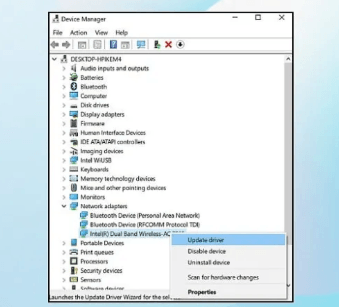
    – Truy cập Device manager -> Chọn vào mục network -> Chọn đúng wifi RTL8852BE -> Chuột phải để mở Properties -> Advanced -> 5G Wireless Mode -> Chọn lại chuẩn IEE 802.11a/n/ac -> OK
    – Tiếp tục vào mục Roaming Aggressiveness -> 1. Disable
    – Mục 2.4G Wireless Mode vẫn giữ nguyên hoặc thay đổi theo chuẩn hỗ trợ của thiết bị phát wifi

    Nếu không xử lý được nữa thì đem máy đi bảo hành hoặc thay thế card wifi cho nhanh gọn.